How to swap tokens on Algorand (2026 guide)
Published , updated by Haystack
The easiest way to swap tokens on Algorand is Haystack. Connect a wallet, pick the token you pay with and the token you want, enter an amount and approve. The Haystack Router checks Algorand’s DEXes for the best price, and the swap settles in seconds.
Haystack is also an all-in-one DeFi app for Algorand. From one account you can find new tokens, stake, earn yield, add liquidity, launch a token and track your portfolio, on the web at hay.app and in the Haystack app for iOS and Android. Developers can read the same token prices and market data through the Haystack API.
How do I swap tokens on Algorand?
Open hay.app/swap, connect an Algorand wallet, choose two tokens, enter an amount and approve. Keep a little ALGO in the wallet for network fees, which are 0.001 ALGO per transaction.
- Open the Swap page. Go to hay.app/swap in any browser, or use the Haystack app on your phone.
- Connect your wallet. Click Connect Wallet. Choose Haystack Login and Create account to make an account with a passkey, or connect Pera, Defly or Lute.
- Choose the tokens. Pick the token you pay with on top and the token you receive below. Search by name, ticker or asset ID. The arrow between them switches the two.
- Enter an amount. Type it, or tap 10%, 25%, 50% or Max. Max on ALGO keeps enough back for network fees. You can also type the amount you want to receive, and Haystack works out what you pay.
- Check the quote. The card shows what you receive, its dollar value and the price impact. Details shows the exchange rate, the minimum you will receive, the fee and the route your trade takes across DEXes.
- Swap. Click Swap and approve in your wallet. Pera and Defly ask you to confirm on your phone, and Lute in its extension. Haystack Login signs straight away while it is unlocked.
- Done. A confirmation appears within seconds, with a link to the transaction on the Allo block explorer. The new token is in your wallet and in Haystack’s Portfolio.
Every token also has its own page on Haystack, with a price chart, live trades, holders and a Buy and Sell card, so you can research and trade in one place.
What do I need to swap on Algorand?
You need an Algorand wallet and some ALGO. Haystack takes care of the rest, including token opt-ins.
A wallet
- Haystack Login is Haystack’s own wallet and the quickest way to start. You create an account on hay.app with a passkey (Face ID, Touch ID, Windows Hello or your password manager), and it runs in your browser. It signs trades without a pop-up while unlocked, and its key is post-quantum (Falcon-1024). Your account has a recovery phrase too. Export it from the wallet menu and keep it somewhere safe.
- Pera Wallet and Defly are Algorand’s most popular mobile wallets, and both connect to Haystack. On a computer, scan the QR code with the app.
- Lute is a browser extension wallet that connects to Haystack in one click.
Some ALGO
Every Algorand transaction pays a network fee in ALGO, and every account keeps a small minimum balance.
- 0.1 ALGO for the account itself.
- 0.1 ALGO more for each token the account holds, locked while you hold it.
- 0.001 ALGO per transaction in network fees. A routed swap is several transactions, so budget a few hundredths of an ALGO.
No ALGO yet? Use the Deposit button in Haystack’s Portfolio. It takes a card, Apple Pay, Google Pay, Cash App or crypto from other chains, and delivers ALGO to your wallet. You can also buy ALGO on an exchange and withdraw it to your Algorand address.
Opt-ins
An Algorand account can only receive a token after it opts in to that token. The opt-in is a zero-amount transaction to yourself, and it locks 0.1 ALGO of your balance. Haystack adds the opt-in to your swap when you buy a token for the first time, so it is still one approval.
The right asset ID
Every Algorand token has a numeric asset ID. Names are not unique, and anyone can create a token called “USDC”. The real USDC on Algorand is asset ID 31566704, and ALGO is 0. Before you buy, check the asset ID and the verified badge next to the name.
Why does Haystack get better prices?
Haystack sends every swap through the Haystack Router, which checks the pools of every major Algorand DEX for your exact trade and splits it wherever that returns more. A single DEX only sees its own pools.
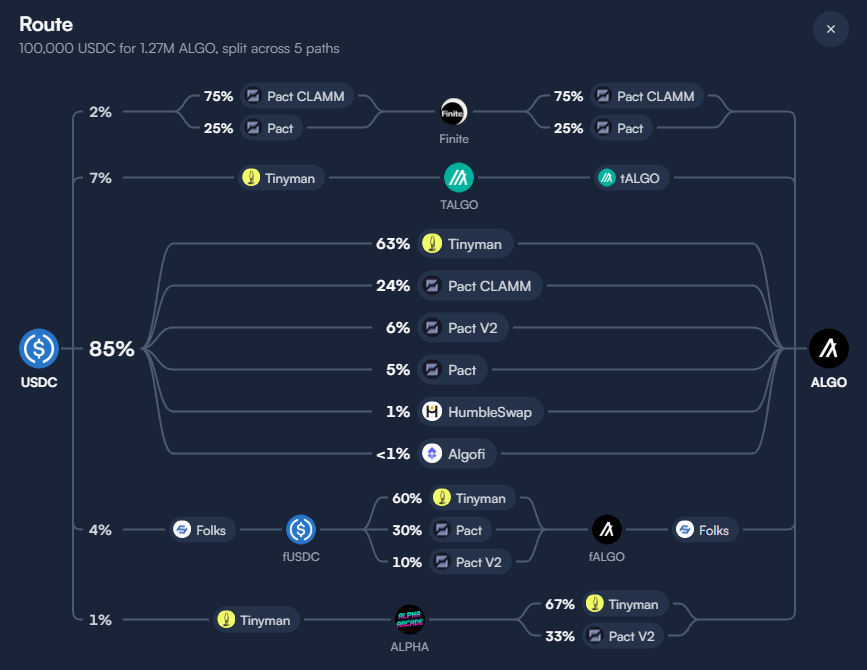
Liquidity on Algorand is spread across Tinyman, Pact, HumbleSwap, Folks Finance and the xALGO and tALGO liquid staking contracts. Each pool’s price moves as you trade against it (price impact), so a large trade in one pool gets a worse price than the same trade split across several. For each quote, the Haystack Router:
- searches routes across all of those venues, including Pact’s stableswap and concentrated liquidity pools;
- splits the trade across pools, and through intermediate tokens, when that returns more;
- trades tokens still on a Haystack Launch bonding curve, with the curve as one step of the route;
- builds the whole route as one atomic transaction group.
An atomic group is a set of Algorand transactions that succeed together or fail together. A swap can’t half-complete. If the price moves past your slippage limit, the whole group fails and your tokens stay in your wallet.
TxnLab, the team behind Haystack, builds the Haystack Router. It is an entirely new router that replaced Deflex, TxnLab’s earlier Algorand swap router. Other apps run on it too. Pera Wallet’s in-app swap routes through the Haystack Router, which Pera’s help page still lists under the Deflex name. Developers can add it to their own apps with the @txnlab/haystack-router SDK.
How much does it cost to swap on Algorand?
A swap on Haystack costs a 0.50% to 1.00% Haystack fee plus each pool’s own fee, both already in your quote, and a few hundredths of an ALGO in network fees. HAY holders pay up to 80% less.
- Network fee: 0.001 ALGO per transaction, usually 0.005 to 0.02 ALGO in total for a routed swap. It goes to the Algorand network.
- Pool fee: set by each pool, with 0.3% as Tinyman’s default. It goes to the pool’s liquidity providers.
- Haystack fee: 1.00% under $25, 0.85% from $25, 0.75% from $250 and 0.50% from $2,500. Haystack takes it from what you receive.
- Opt-in deposit: 0.1 ALGO the first time you receive a token. It stays in your wallet as minimum balance, so it isn’t spent.
Holding HAY, Haystack’s token, lowers the Haystack fee. $10 of HAY in your wallet or staked takes 10% off, rising to 80% off at $25,000. The fees also pay HAY stakers. Fees taken in HAY all go to stakers, and fees in other tokens are split 70% to stakers, 25% to Haystack’s treasury and 5% to buying and burning HAY. The full schedule is in the Haystack docs.
Accounts with post-quantum (Falcon) keys, such as Haystack Login passkey accounts, pay 0.003 ALGO per transaction instead of 0.001, because their signatures are larger.
Slippage and price impact
These two aren’t fees, but they decide what you receive.
- Price impact is how much your own trade moves the price, and Haystack shows it with every quote. Small trades in liquid tokens have almost none. A large trade in a thin pool can have several percent.
- Slippage tolerance is how far the result may fall below the quote if other trades land first. Haystack’s default is 5%, and you can change it in Settings. Your swap sets a minimum amount out on chain. If the result would be lower, the swap fails and nothing leaves your wallet.
What else can I do on Haystack?
Haystack covers the rest of Algorand DeFi from the same account and the same wallet, so you don’t need a separate app for each step.
- Find tokens. Tokens lists trending tokens, the top tokens by liquidity and new launches, with live prices. Haystack flags tokens whose trading looks manipulated and tags wallets linked to a token’s creator.
- Stake HAY. Stake HAY to earn a share of Haystack’s swap fees, paid in USDC and HAY.
- Earn yield. Yield lists what each token can earn: lending on Folks Finance, liquid staking with xALGO and tALGO, and Pact farms. Haystack Login accounts can turn on auto yield, which deposits tokens as they arrive and draws on those earnings when you spend.
- Provide liquidity. Add to and withdraw from Tinyman and Pact pools, including Pact’s concentrated liquidity ranges.
- Launch a token. Haystack Launch creates a token on a bonding curve that moves to a Pact pool once it fills. Creators earn a share of the trading fees, and each week’s Liftoff competition pays the creators of the top three new tokens up to 10,000 HAY.
- Predict prices. PvP markets let you call a token’s price up or down against other players.
- Track everything. Portfolio shows your holdings, your profit on trades, your earning positions and everything waiting to be claimed.
- Ask about a token. ZeroSignal answers questions about a token or your portfolio with AI, using the token’s market data and the chain itself. It’s available to Haystack Login accounts.
- Claim airdrops and invite friends. Drops lists token airdrops anyone can claim or create, and your invite link earns you 25% of the trading fees from people you bring.
How do I get Algorand token prices from an API?
Use the Haystack API. A request to https://api.hay.app/api/assets/prices returns the current price of up to 100 Algorand tokens at once, in ALGO and in USD, from the same data that powers hay.app.
curl -H "X-API-Key: hay_pk_s5ltqlgh6i44npsb2m2qarpolc" \
  "https://api.hay.app/api/assets/prices?asset=0&asset=3160000000"
Each token comes back with its id, its price in ALGO, its usdPrice and a priceConfidence score from 0 to 1, which is higher when deeper liquidity backs the price. Asset 0 is ALGO and 3160000000 is HAY.
The same API covers the rest of the market data Haystack shows:
- Market data.
/api/assetsadds 24h volume, market cap, liquidity, holders and price changes from 5 minutes to 30 days, and searches tokens by name. - Price history.
/api/getChartreturns price candles from 1 minute to 7 days. - Trending and movers.
/api/assets/trendinglists the most traded tokens, and/api/assets/moversthe biggest gainers and losers. - Pools.
/api/poolslists the pools that hold a token, deepest first. - Live prices. A WebSocket at
wss://api.hay.app/api/wsLiveDatastreams price changes, trades and market data as they happen.
The key above is Haystack’s free key for servers, scripts and apps. It allows 1,000 requests a day per IP address and doesn’t work from web pages. For a website or higher limits, request your own key. The Haystack API docs cover every endpoint, and the prices section has the details.
Common swap errors and how to fix them
- “Overspend” or “balance below minimum.” The wallet doesn’t have enough ALGO for the network fee and its minimum balance. Add ALGO, or swap slightly less. Using Max on ALGO keeps the fees back for you.
- “Asset not opted in” or “must opt in.” The receiving account hasn’t opted in to the token. Haystack adds the opt-in to the swap for you, so this shouldn’t happen there. Elsewhere, opt in from your wallet first.
- The swap failed because the price moved. Another trade changed the pool before yours landed, past your slippage tolerance. The whole group was rejected, so your tokens didn’t move. Get a fresh quote and try again, or raise slippage slightly for a volatile token.
- The quote keeps changing. Prices move with every trade. Haystack refreshes the quote every 10 seconds and won’t execute one that has gone stale.
- You can’t find the token. Search by its asset ID instead of its name. Copy the ID from the project’s official site or from an Algorand explorer.
- Nothing appears in your wallet app. Open Pera or Defly and check it is still connected. If not, disconnect in Haystack and connect again.
- A post-quantum account fails with a fee error. Pera and Lute quantum accounts need the wallet to report their account type. Disconnect the wallet in Haystack and connect it again. Note that Pera’s own swap doesn’t support quantum accounts yet, and Haystack’s does.
Frequently asked questions
What is the best way to swap tokens on Algorand?
Haystack is the easiest place to swap on Algorand. Its router compares Algorand’s DEXes for every trade, it works with Haystack Login, Pera, Defly and Lute, and the same app covers staking, yield, liquidity and token launches.
Do I need ALGO to swap on Algorand?
Yes. Every transaction pays a network fee in ALGO (0.001 ALGO each), and every account keeps a minimum balance of 0.1 ALGO plus 0.1 ALGO for each token it holds. Keep at least 1 ALGO in your wallet to be comfortable.
How long does a swap on Algorand take?
A few seconds. Algorand transactions are final as soon as they are in a block, so there is no waiting for extra confirmations.
What is a DEX aggregator?
A DEX aggregator compares prices across decentralized exchanges and routes your trade through the best combination of pools. The Haystack Router is the aggregator behind Haystack, and other Algorand apps use it too, including Pera Wallet’s in-app swap.
What was Deflex?
Deflex was TxnLab’s earlier swap router for Algorand. The Haystack Router replaced it with an entirely new router, built by the same team.
Is there an API for Algorand token prices?
Yes. The Haystack API’s /api/assets/prices endpoint returns the current ALGO and USD price of up to 100 Algorand tokens per request. A free key for servers and scripts allows 1,000 requests a day, and the Haystack API docs explain how to get a key of your own.
Can I swap Algorand tokens on my phone?
Yes. The Haystack app for iOS and Android swaps on mobile, and hay.app works in a phone’s browser. Pera and Defly users can connect their mobile wallets to Haystack too.
Is swapping on Algorand safe?
The swap itself is atomic. It completes in full or not at all, and a minimum amount out protects you from bad fills. The main risk is buying the wrong token, so always check the asset ID. Haystack never holds your funds, which stay in your own wallet.
What can I do on Haystack besides swapping?
You can find and research tokens, stake HAY for a share of swap fees, earn yield on Folks Finance, xALGO, tALGO and Pact farms, add liquidity on Tinyman and Pact, launch a token, play PvP price markets and track your whole portfolio.
Do I need HAY to use Haystack?
No. Anyone can swap on Haystack without holding HAY. Holding or staking HAY lowers your swap fee by 10% to 80%, and staking HAY earns a share of swap fees.
Start swapping on Haystack
Open hay.app, create a Haystack Login account with a passkey or connect Pera, Defly or Lute, and make your first swap. Then explore the rest of Algorand DeFi from the same app.